

Rapid Refund
Jump the queue, get 50% paid upfront
Average Claim £3,000
We'll tell you straight away what you're owed

Free to enquire
It's free to find out if you have a claim
No Hidden Costs
All aftercare is included
Let's get your cash back from HMRC and into your pocket. Simply update your account with:
and we’ll get your tax refund on all those expenses back for you again this year.
Getting started is quick and easy just log in to MyRIFT or the RIFT Tax Refunds App to start your next refund and upload your documents today.

Who you worked for and where.
We can look up addresses based on your employer and past history.
How you traveled to work and what it cost
Plus any food, tools or equipment you bought and weren't paid by your employer.
What you earned and how much tax you paid
Upload your payslip and P60s and we'll do all the calculations.

 Start now

Last year, over 13,000 people came back to RIFT and discovered they were owed another refund.
If you’ve worked or travelled for your job again this year, use our eligibility checker to see if you can claim too. It’s quick, simple, and could put hundreds of pounds back in your pocket.
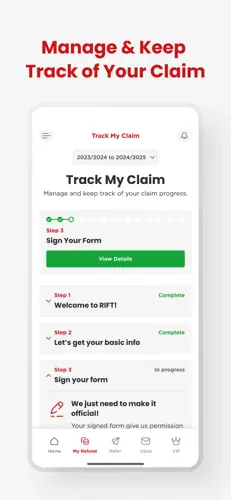
The RIFT Tax Refunds App makes it simple to see what you could get back and stay on top of your refund all year round.
With our latest update, you can:
As you already have a MyRIFT login, you can sign in right away.
The new version of the app has just been launched so if you're already using it don't forget to upgrade for all the new features.
Download the RIFT App from the Google Play or Apple Store and claim your next refund.
Manage your refund

Every step of the way.
While families all across the UK are juggling costs to manage their spending HMRC’s sitting on hundreds of millions of pounds in tax refunds just waiting to be claimed. As RIFT MD Bradley Post puts it:
We know how hard you work and how hard it can be to catch every little receipt and expense to make sure you don’t miss out on what you’re owed. We helped our customers get back £32m that was owed to them last year. It’s shouldn’t be difficult to get what belongs to you so we’ve worked hard on making it easy. Don’t let HMRC grab what you’ve earned
Use our Live Chat option to chat to an advisor online or call us on 01233 628648 – we’re here to help.
For more help you can read our MyRIFT FAQs below.
You'll need a MyRIFT account to hold all the information needed to make your tax refund claim with us. It's free to set up and it's the easiest way to update your info, track your documents and make your claim.
New to RIFT
If you're new to RIFT and wanting to get your claim started, have checked that you're due a refund by answering the 4 simple questions, and filled in your name, email address and created a password then you've already created your account. You should also have received a Welcome to RIFT email that contains more information about what happens next and has all the links you need.
Login page to continue updating your information.
If you need to reset your password, you can do that from the login page.
If you need any help, give us a call on 01233 628648 or use the Live Chat to talk to one of our Customer Service Team.
Returning to RIFT
If you've claimed with us before using a paper Refund Pack or Forms by Phone and not yet set up your MyRIFT account then get in touch by calling 01233 628648 or using the Live Chat below and we can get your account created and make it easier for you to claim this year.
Once you're logged in you'll be able to fill in your personal details, work locations, expense details and upload relevant documents. It's everything you're used to doing when making a claim with RIFT, but much quicker and easier now. You can also track the progress of your claim whenever, and wherever, you want to.
Once you are happy you have uploaded all the necessary information, press submit and we will take it from there!
You can call or Live Chat with us us 8.30am to 8.30pm Monday to Friday and 9.30am to 1.30pm Saturday.
Outside of these time you can send us an email to info@riftrefunds.co.uk or go to our Facebook page and send us a private message
If you're already a RIFT customer and have given us information online before then you'll have done that using your MyRIFT account. If you can remember your login details, you can sign, update your info for this year, upload your documents and get started right away.
It might be a year or more since you last used your MyRIFT account, so if you can't remember the details (email and password) you used to set it up just get in touch using the Live Chat here on the site, call 01233 628648 or drop us an email to info@riftrefund.co.uk and we'll get it all reset and ready for you to use again.
If you've claimed with us before using a paper Refund Pack or Forms by Phone and not yet set up your MyRIFT account then get in touch and we can get your account created and make it easier for you to claim this year.
If you're not sure if you've got an account get in touch and we can check for you. If you have, we'll help you get started, if not, we'll get you set up.
You can call or Live Chat with us us 8.30am to 8.30pm Monday to Friday and 9.30am to 1.30pm Saturday.
Outside of these time you can send us an email to info@riftrefunds.co.uk or go to our Facebook page and send us a private message
If you forget your password for your MyRIFT account, look below the log in button and you'll see a helpful link to ‘reset your password’.
Click the link, enter the email address you use to login to your MyRIFT account and we will email you a link to reset your password.
Once you get the email, open it and click the link which will take you a page where you'll be asked to create, and then confirm, the new password you want.
Press ‘change password’ and you will be taken to the homepage of your MyRIFT account.
If you can't remember the email address you used when setting up your account, or need help with anything else, please give us a call on 01233 628648 or use the Live Chat below and we can get you all set up.
If your email address has changed since you set up your account, or if you want to use a different email address for any reason then it's easy to update.
If you still have access to your old email account, use it to login and then you'll be able to update your email address on your MyRIFT Personal Dashboard.
If you no longer have access to your old email address, or can't remember it, and need us to update your account to your new address then give us a call on 01233 628648 or use Live Chat and our team will be happy to get it all sorted out for you.
There are a couple of reasons that you may have a MyRIFT account and not realise it.
Account created a long time ago
The most common is that you set one up when you first made an enquiry to RIFT, and that could have been quite a while ago. If you answered the 4 questions on our website to see if you were due a refund you would have been given the option to set up your account. Do you remember filling in your name, email address and creating a password? If so that's when it was set up and you would have also received a confirmation email.
If you have an account already, and can remember the details you gave when it was created, you can use them to login, reset your password or update your email, and then continue with your claim online.
If you aren't sure of any of the details you used and need us to reset them, give us a call on 01233 628648 or use Live Chat and our Customer Service Team can help you.
Account created for you by Customer Services and never needed
If you made a claim with us over the phone one of our Customer Service Team may have asked you if you would like them to set an account up for you to use. If they did this then you would have been sent an email with instructions on how complete the set up and create your password and confirm login details, but if this was it the case it was probably more than a year ago now.
What this means is that the account is sitting there in the system, even if you never needed to use it.
It's easy to get it reactivated so that you can update your info, upload your documents and track the progress of your claim this year, though.If you do still have the set up email, you can follow the instructions but it's probably easier to just give us a quick call on 01233 628648 or use Live Chat and we can get it all working for you.
You can call or Live Chat with us us 8.30am to 8.30pm Monday to Friday and 9.30am to 1.30pm Saturday.
Outside of these time you can send us an email to info@riftrefunds.co.uk or go to our Facebook page and send us a private message
If you're having trouble logging in and need to check the email address you used to set up your account, simply give us a quick call on 01233 628648 or use the Live Chat and our we'll be able to quickly check for you.
Once you know, you can log in and carry on, or if you'd like to update the email on the account then we can do that for you there and then.
You can call or Live Chat with us us 8.30am to 8.30pm Monday to Friday and 9.30am to 1.30pm Saturday.
Outside of these time you can send us an email to info@riftrefunds.co.uk or go to our Facebook page and send us a private message.
RIFTPROD1 - Subscriber